


View Thread
Page 1 of 2: 12
|
 HOW-TO SET UP PDS/NGCS ON PC (and STEAM) --- !READ BEFORE POSTING!
|
|
| Homdax |
Posted on 04-10-2005 08:21
|
 Posts: 762 Joined: August 30 2005 |
BELOW IS GENERALLY VALID FOR HOMEWORLD 2 CLASSIC ON STEAM. YOU NEED TO ADAPT THE FILE PATH TO REFLECT YOUR STEAMAPPS FOLDER. Edit June 2024./ Homdax. --------------------------------------------------- --------------------------------------------------- ...for BIG file release browse further down... We recommend that you download the BIG file version of PDS/NGCS if you are unfamiliar to Homeworld 2's data file system ------------------------------------------------ Data-Folder release - Not BIG-file You download the file. 0. Make sure Your Homeworld 2 installation works, and is patched to 1.1 You can play. 1. Check Your Homeworld 2 directory for other stuff in the \Data\ folder. Anything that is not *.big-files or the folder \Animatics\, DELETE IT! Or put it away, if you want to keep it. You could copy Your Data folder and rename it something else. 2. Unzip the PDS/NGCS files STRAIGHT IN TO Your Homeworld 2 directory. It will create/overwrite the Data folder but not the contents. A bunch of new folders will have appeared. These: 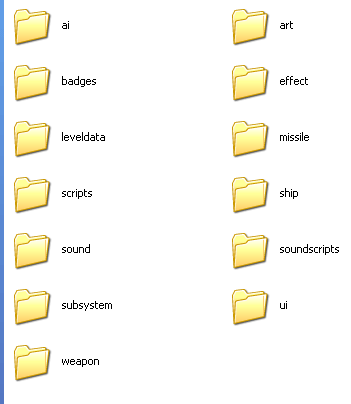 Note that You should have another folder called Animatics, and a few big files in You Data folder. This image DO NOT list everything You should have in Your Data folder. ONLY what the PDS zip have extracted to it. 3. Shortcut . Make a copy of You regular Homeworld 2 shorcut You shouold have on Desktop. - Look at this line in it G:\Homeworld2\Bin\Release\Homeworld2.exe - The part G:\Homeworld2\ is irrelevant. It MUST reflect YOUR Homeworld Installation Path. (C:\Program Files\Sierra\Homeworld 2\ EXAMPLE) - AFTER Homeworld.exe ADD: -overrideBigFile. Spell it RIGHT! - Place quotations marks "" surrounding everything from the drive letter to the last e of .exe. Like this "G:\Homeworld2\Bin\Release\Homeworld2.exe" Final result: "G:\Homeworld2\Bin\Release\Homeworld2.exe" -overrideBigFile OK If anything You think is not covered here, post below. And ONLY below. Edited by Homdax on 24-06-2024 15:16 |
|
|
|
| Homdax |
Posted on 25-10-2005 09:00
|
|
Posts: 762 Joined: August 30 2005 |
BIG-file release This covers both my "premade" script and files available with no shortcut script ------------------- As above, make sure Your game works and is patched to 1.1. BIG-file ONLY release (typically only a file named after the mod with extension .big inside a zipped archive). Unzip the file. Copy it in to Your Homeworld2\Data folder Make a shortcut (copy the original Homeworld2 desktop shortcut). In the Target field of the shortcut make sure You type: "installation path\Bin\Release\Homeworld2.exe" -mod pds731.big Observe the quotes and spaces. pds731 is only an example. --- Premade script, not yet available for PDS 7.3.1 Download the file Run it. It should find the default game folder, but if You have altered the installation path You need to browse for it. Unpack it in to the root of Your HW2 directory. NOT in to the HW2\Data-folder. If You unpack it in to the \Data folder, You will end up with two Data folders, like this ...\HW2\Data\Data\big-file. That will mess up the game. Shortcut should be generated on Your desktop automatically. Edited by Homdax on 10-10-2006 07:48 |
|
|
|
| Homdax |
Posted on 25-10-2005 12:02
|
|
Posts: 762 Joined: August 30 2005 |
I received some help from nemmerle with this: Problem: The game fails to load the campaign correctly, after upgrading to V7.0 of PDS. Probable cause: This is due to an incompatibility in assets between those that are indicated as present in the savegame file and those that are present in the assets. Solution: Due to the way Homeworld 2 handles the campaign files (persistent fleet and so on) the way around this is to delete your profile and start a new one. To do so locate your profile folder in the homeworld 2 install directory (it should be under Homeworld2/Bin/ ) and delete it. Then run the game and create a new profile in the menu, this should fix the problem. --- |
|
|
|
| Agga |
Posted on 08-03-2006 01:40
|
 Posts: 6 Joined: March 08 2006 |
My copy works fine, I can play vanilla HW2. Install everything, can still play vanilla. When I add the overridebigfile parameter, I don't get a new start screen, if I go into the campagin it's the same, and the hyperdrivecore, plus the resource collectors disappear then don't come back/ are not selectable once the first mission starts. I can play a skirmish, and the duels work, but no new ships, or anything, just the basic stuff. Using the zip install of the latest released pds. (1.4) Any help would be appreciated. Edited by Agga on 08-03-2006 01:42 |
|
|
|
| TelQuessir |
Posted on 08-03-2006 01:51
|
 Posts: 2598 Joined: August 30 2005 |
Latest? v1.4 dates from 2004! |
|
|
|
| Agga |
Posted on 08-03-2006 02:55
|
|
Posts: 6 Joined: March 08 2006 |
pds7[1].4 My bad |
|
|
|
| TelQuessir |
Posted on 08-03-2006 03:00
|
|
Posts: 2598 Joined: August 30 2005 |
Well select PDS8 duels - you'll see all the ships have funky names like PCG12 and DHA75. |
|
|
|
| Agga |
Posted on 08-03-2006 03:31
|
|
Posts: 6 Joined: March 08 2006 |
Yes, I was under the impression there was a full campaign, and skirmish mode also, no? |
|
|
|
| TelQuessir |
Posted on 08-03-2006 03:42
|
|
Posts: 2598 Joined: August 30 2005 |
If you help me write backgrounds and/or create the mission maps you'll see them appear faster. PDS7/7.2 has the SP campaign working and there are also a variety of skirmish options/maps available. Be sure NOT to try to put 7.4 over 7.2 as 7.4 is a standalone item. |
|
|
|
| Agga |
Posted on 08-03-2006 03:44
|
|
Posts: 6 Joined: March 08 2006 |
Well, neither of those works right now, only the duels. :/ |
|
|
|
| TelQuessir |
Posted on 08-03-2006 03:45
|
|
Posts: 2598 Joined: August 30 2005 |
7.4 right? I didn't imply it was anything more than showcasing a -conceptual- system of combat simulation though dueling conditions with three ship classes. |
|
|
|
| Agga |
Posted on 08-03-2006 04:05
|
|
Posts: 6 Joined: March 08 2006 |
Right, after reading further I cleared that up. I was linked to the mod from moddb, who have it advertised as a complete overhaul of campagin, skirmish etc. . . and linked to the latest version, which was the file I downloaded. In the duels all the ships seem extremely fast paced. Will get back to this tomorrow. Should I be using the NGCS install instead? Edited by Agga on 08-03-2006 04:08 |
|
|
|
| TelQuessir |
Posted on 08-03-2006 05:25
|
|
Posts: 2598 Joined: August 30 2005 |
Complete overhaul, like I specifically mentioned above, pertains to V7 and 7.2. Which is why we need a new name for V8, yes? V8 duels are that fast for the different nature of the battlespace - with PDS being WW2-paced for special effects, and NGCS and V8 going towards what it should be in an actual space war. Death happens fast with missiles flying at 10km/s, and DEWs with near-perfect accuracies, so detection and counter-detection ability is important in upcoming, proper-scaled scenarios. |
|
|
|
| Homdax |
Posted on 13-03-2006 07:44
|
|
Posts: 762 Joined: August 30 2005 |
Administrative Note: Exclusiveness of PDS 7 in instructions above removed. All instructions are generally applicable on all releases of the PDS/NGCS Universe. king-o'da'bigfile
|
|
|
|
| Gnypatul |
Posted on 13-03-2006 15:56
|
|
Posts: 1 Joined: November 10 2005 |
Hi there, I hate to sound like a whining minority, but how do you get PDS to work on a Mac? I downed the PDS 7 release for Mac, then shuffled around a bit with the files, but nothing really seems to do anything :confused: Any help would be greatly appreciated. ---- Ah I see the info is all there, haha, just got thrown into this forum from the wrong angle. Feel free to ignore my puny comments. Anyway great mod :thumbs: Edited by Gnypatul on 13-03-2006 16:27 |
|
|
|
| Sun Tzu |
Posted on 13-03-2006 16:31
|
 Posts: 528 Joined: September 08 2005 |
Halleluyah! |
|
|
|
| Homdax |
Posted on 13-03-2006 18:42
|
|
Posts: 762 Joined: August 30 2005 |
:lol:
king-o'da'bigfile
|
|
|
|
| Tom117 |
Posted on 26-07-2006 13:40
|
|
Posts: 1 Joined: July 26 2006 |
I followed every instruction posted above. Yet still my PDS Mod won't work. Theres nothing related to it on the game. I don't know what the problem is... :mad:
 |
|
|
|
| Silent_Assasin |
Posted on 26-07-2006 15:15
|
|
Posts: 43 Joined: June 28 2006 |
Knowing what version you are trying to install and whether or not its in a big file format would help us help you.
 USMC Pilot candidate |
|
|
|
| Rynx |
Posted on 07-08-2006 08:07
|
|
Posts: 2 Joined: January 26 2006 |
So do we just donwload one of the downloads or do we have to get vanilla PDS, then the other files such as 1st,2nd,3rd or NGCS files? I just got back to using this profile so don't go to harsh on me lol. Rynx
With every action comes a consequence. |
|
|
|

Page 1 of 2: 12
| Jump to Forum |